Skip to content

How to block AI videos on YouTube

YouTube has no setting that filters out AI videos. Some of them carry a label for altered or synthetic content. To hide them from Home and search, you need a filter that checks that label and the words in video titles.
Add to ChromeComing to the Chrome Web StoreTry the demo
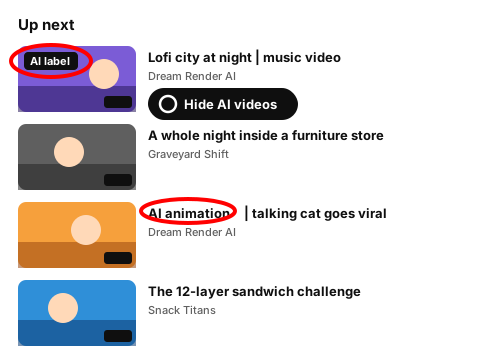
Drawing of an Up next list with a thumbnail's AI label ringed in red and a Hide AI videos badge, and the words AI animation ringed in another title

What YouTube gives you

The label is there, but you can't filter by it. The YT Block extension adds a Hide AI videos switch that uses the label and a word pack for titles. You can try it below.

Try the AI filter

Switch on Hide AI videos. Cards with YouTube's AI label go, and so does any title that matches the word pack. Remove a word that catches too much, or add one you keep seeing. No filter catches every AI video, so each card also has Block channel.

Made-up channels and videos. The rules behave the way they do in the extension.

Try:

Uses YouTube's AI label where a video has one, and the word pack below.

  • Word pack:

Showing all 6 items. Nothing is hidden yet.

14:02

Filling my sister's garage with 5,000 paper planes

Stunt Goblins

AI label1:02:00

Lofi city at night | AI generated music video

Dream Render AI

18:40

Reacting to the weirdest gadget ever sold

Hot Take Hour

16:08

Season finale spoiler talk: who really won?

Couch Critics

0:58

Talking cat goes viral (AI animation)

Dream Render AI

11:55

Rubber snake prank on my dad (he jumped)

Stunt Goblins

How the extension hides AI videos

  1. 1

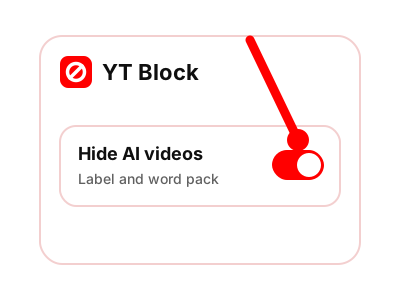
    Turn on Hide AI videos. Where YouTube shows its altered or synthetic content label on a video, that video is hidden.

    Drawing of the YT Block panel with a red pointer on its Hide AI videos switch
    The Hide AI videos switch in the panel, turned on.
  2. 2

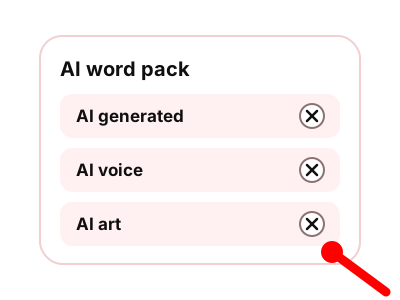
    The extension also checks each video title against a word pack: AI generated, AI voice, AI art and a few more. Upper or lower case doesn't matter. Remove words or add your own.

    Drawing of the AI word pack with AI generated, AI voice and AI art, and a red pointer at the remove mark next to AI art
    The AI word pack, each word with a remove mark.
  3. 3

    Matching videos leave Home, search results and Up next. Shorts cards follow the same rules.

  4. 4

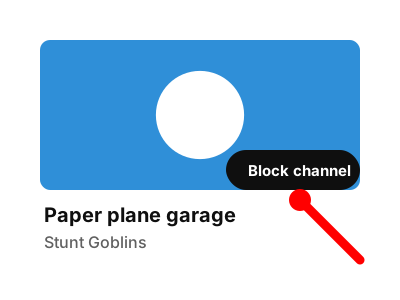
    Some AI videos have a plain title and no label, and they get through. For a channel like that, press Block channel on any of its cards and all of its videos go.

    Drawing of a video card with a red pointer on its Block channel button
    The Block channel button on a video card (made-up channel).

The AI pack works like the keyword filter with the words already filled in, so you can hide other topics the same way. For whole channels, see how to block YouTube channels.

Questions about blocking AI videos

How accurate is the AI filter?

It isn't perfect. It goes by what a video shows: YouTube's label and the words in its title. An AI video with an ordinary title and no label gets through. If that keeps happening with one channel, block the channel.

Will it hide useful videos about AI?

It can. A tutorial called "AI art for beginners" matches "AI art". Remove that word from the pack and videos like it come back.

Does it work on Shorts?

Yes. Shorts cards are hidden by the same rules as regular video cards.

Hide AI videos with one switch

The extension adds a Hide AI videos switch and a word pack you can edit.

Coming to the Chrome Web Store

Coming to the Chrome Web Store

The extension is being finished and isn't in the store yet. Until then, the tools on this site work right here in your browser.